Game/Unity
종속성 분석 툴 제작 - 2
hvv_an
2025. 3. 25. 00:09
종속성 분석 툴 제작
이전 포스팅에서 툴의 외형을 그리는 것까지는 완료하였다.
이번에는 UI에 기능을 추가하여 그래프를 그리는 것까지 해보자.
컨트롤 패널 기능
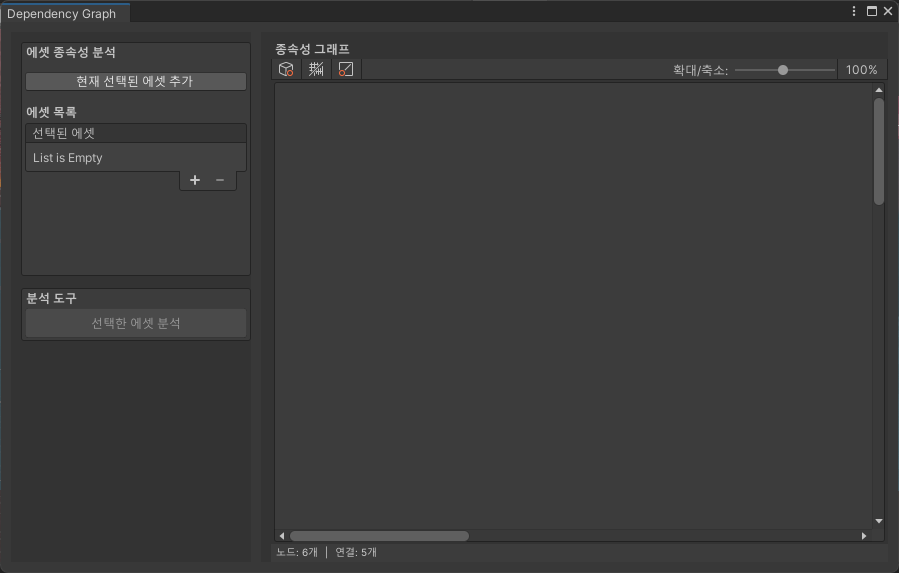
우선 선택된 에셋에 에셋을 등록하는 것을 구현해 보자.
private void InitializeAssetList()
{
    assetList = new ReorderableList(selectedAssets, typeof(string), true, true, true, true);

    // 헤더 설정
    assetList.drawHeaderCallback = (Rect rect) => {
        EditorGUI.LabelField(rect, "선택된 에셋");
    };

    // 요소 그리기
    assetList.drawElementCallback = (Rect rect, int index, bool isActive, bool isFocused) => {
        if (index < selectedAssets.Count)
        {
            string assetPath = selectedAssets[index];
            string assetName = System.IO.Path.GetFileName(assetPath);

            // 아이콘 표시
            Texture icon = AssetDatabase.GetCachedIcon(assetPath);
            if (icon != null)
            {
                GUI.DrawTexture(new Rect(rect.x, rect.y, 16, 16), icon);
            }

            // 에셋 이름 표시
            EditorGUI.LabelField(new Rect(rect.x + 20, rect.y, rect.width - 20, rect.height), assetName);
        }
    };

    // 추가 버튼 이벤트
    assetList.onAddCallback = (ReorderableList list) => {
        string path = EditorUtility.OpenFilePanel("에셋 선택", "Assets", "");
        if (!string.IsNullOrEmpty(path))
        {
            // 프로젝트 경로로 변환
            string relativePath = path.Replace(Application.dataPath, "Assets");
            if (!selectedAssets.Contains(relativePath))
            {
                selectedAssets.Add(relativePath);
            }
        }
    };

    // 항목 제거 버튼 이벤트
    assetList.onRemoveCallback = (ReorderableList list) => {
        if (list.index >= 0 && list.index < selectedAssets.Count)
        {
            selectedAssets.RemoveAt(list.index);
        }
    };

    // 선택 이벤트
    assetList.onSelectCallback = (ReorderableList list) => {
        if (list.index >= 0 && list.index < selectedAssets.Count)
        {
            string assetPath = selectedAssets[list.index];
            Object asset = AssetDatabase.LoadAssetAtPath<Object>(assetPath);
            if (asset != null)
            {
                EditorGUIUtility.PingObject(asset);
            }
        }
    };
}
ReorderableList의 액션에 대한 callback으로 기능 구현이 가능하다.
- drawElementCallback
- 요소를 그리는 콜백, 정해진 rect가 매개변수로 주어지고 rect를 어떻게 구성할지 작성
- 파일 경로에 해당하는 Icon과 파일 이름을 rect에 그려준다.
- onAddCallback
- +버튼이 눌리면 불리는 콜백
- EditorUtility.OpenFilePanel을 통해 에셋을 선택할 파일 탐색기를 연다.
- 이미 선택된 파일이 아니라면 추가한다.
- onRemoveCallback
- -버튼이 눌리면 불리는 콜백
- 선택된 에셋을 삭제, 매개변수로 전달된 list의 index를 통해 삭제한다.
- onSelectCallback
- assetPath를 통해 EditorUtility.PingObject를 통해 강조 표시를 해준다.

추가로 현재 선택된 에셋을 추가할 수 있도록 편의 기능을 만들어 보자.
Selection을 이용하면 유니티 에디터에서 선택된 에셋을 가져올 수 있다.
Selection.activeAsset이 null인지 검사하고 이미 선택된 에셋이 아니라면 추가하도록 구현하였다.
// 현재 선택된 에셋 추가 버튼
if (GUILayout.Button("현재 선택된 에셋 추가"))
{
    if (Selection.activeObject != null)
    {
        string path = AssetDatabase.GetAssetPath(Selection.activeObject);
        if (!string.IsNullOrEmpty(path) && !selectedAssets.Contains(path))
        {
            selectedAssets.Add(path);
            Repaint();
        }
    }
}
이제 버튼을 통해 그래프를 그려보자.
우선, 선택된 에셋만 그려 보자.
버튼을 누르면 선택된 에셋의 파일명과 확장자를 확인하여 노드를 그린다.
이때, 노드가 그려질 위치를 미리 계산하고 Repaint를 호출하여 그래프 패널이 그려질 때 Rect를 그릴 수 있도록 했다.
private void DrawNode()
{
    // 노드 위치 초기화
    nodePositions.Clear();

    // 노드 위치 설정
    for (var i = 0; i < selectedAssets.Count; i++)
    {
        string assetPath = selectedAssets[i];
        nodePositions[assetPath] = new Rect(100, 100 + i * 80, nodeWidth, nodeHeight);
    }

    // 그래프 영역 다시 그리기 요청
    Repaint();
}

private void DrawSingleNode(Rect position, string title, string type, Color color)
{
    // 그림자 효과
    GUI.color = new Color(0, 0, 0, 0.2f);
    GUI.Box(new Rect(position.x + 3, position.y + 3, position.width, position.height), "", "flow node 0");
    GUI.color = Color.white;

    // 노드 배경
    EditorGUI.DrawRect(position, color);

    // 테두리
    var borderRect = new Rect(position.x - 1, position.y - 1, position.width + 2, position.height + 2);
    EditorGUI.DrawRect(borderRect, new Color(1, 1, 1, 0.3f));

    // 노드 내용
    GUI.Label(new Rect(position.x + 5, position.y + 5, position.width - 10, 20), title, EditorStyles.whiteBoldLabel);
    GUI.Label(new Rect(position.x + 5, position.y + 25, position.width - 10, 20), type, EditorStyles.whiteLabel);
}
그래프 패널을 그리는 과정에서 미리 계산된 노드의 위치를 통해 Rect를 해당 위치에 그려낸다.
private void DrawGraphView()
{
    rightPanelRect = new Rect( leftPanelRect.x + leftPanelWidth + panelSpacing, mainRect.y, mainRect.width - leftPanelWidth - panelSpacing, mainRect.height);
    rightContentRect = new Rect(rightPanelRect.x + contentPadding, rightPanelRect.y + contentPadding, rightPanelRect.width - contentPadding, rightPanelRect.height - contentPadding);

    GUI.Box(rightPanelRect, "");

    GUILayout.BeginArea(rightContentRect);

    GUILayout.Label("종속성 그래프", EditorStyles.boldLabel);

    // 그래프 제어 도구 모음 (상단)
    EditorGUILayout.BeginHorizontal(EditorStyles.toolbar);

    GUILayout.Button(EditorGUIUtility.IconContent("d_ToolHandleLocal"), EditorStyles.toolbarButton, GUILayout.Width(30));
    GUILayout.Button(EditorGUIUtility.IconContent("d_GridAndSnap"), EditorStyles.toolbarButton, GUILayout.Width(30));
    GUILayout.Button(EditorGUIUtility.IconContent("d_ToolHandlePivot"), EditorStyles.toolbarButton, GUILayout.Width(30));

    GUILayout.FlexibleSpace();

    EditorGUILayout.LabelField("확대/축소:", GUILayout.Width(60));
    float zoom = GUILayout.HorizontalSlider(1.0f, 0.1f, 2.0f, GUILayout.Width(100));

    GUILayout.Button("100%", EditorStyles.toolbarButton, GUILayout.Width(50));

    EditorGUILayout.EndHorizontal();

    // 그래프 영역
    Rect graphScrollArea = EditorGUILayout.GetControlRect(false, rightContentRect.height - 60);
    GUI.Box(graphScrollArea, "", EditorStyles.helpBox);

    // 노드 그리기
    foreach (var node in nodePositions)
    {
        string assetPath = node.Key;
        Rect position = node.Value;
        string fileName = System.IO.Path.GetFileName(assetPath);
        string fileExt = System.IO.Path.GetExtension(assetPath).ToLower();

        // 노드 유형에 따라 색상 결정
        Color nodeColor = Color.gray;
        string nodeType = "Unknown";

        if (fileExt == ".cs")
        {
            nodeColor = new Color(0.3f, 0.5f, 0.8f); // 파란색 (스크립트)
            nodeType = "Script";
        }
        else if (fileExt == ".prefab")
        {
            nodeColor = new Color(0.8f, 0.5f, 0.3f); // 주황색 (프리팹)
            nodeType = "Prefab";
        }
        else if (fileExt == ".unity")
        {
            nodeColor = new Color(0.3f, 0.8f, 0.5f); // 녹색 (씬)
            nodeType = "Scene";
        }
        else if (fileExt == ".mat")
        {
            nodeColor = new Color(0.8f, 0.3f, 0.5f); // 분홍색 (머티리얼)
            nodeType = "Material";
        }

        // 노드 그리기
        DrawSingleNode(position, fileName, nodeType, nodeColor);
    }

    // 스크롤 뷰 (가상 캔버스 영역)
    scrollPosition = GUI.BeginScrollView(graphScrollArea, scrollPosition, new Rect(0, 0, 2000, 2000));
    GUI.EndScrollView();

    // 하단 상태 표시줄
    EditorGUILayout.BeginHorizontal(EditorStyles.toolbar);

    GUILayout.Label("노드: 6개", EditorStyles.miniLabel);
    GUILayout.Label("|", EditorStyles.miniLabel);
    GUILayout.Label("연결: 5개", EditorStyles.miniLabel);

    GUILayout.FlexibleSpace();

    EditorGUILayout.EndHorizontal();

    GUILayout.EndArea();
}