종속성 분석 툴 제작 - 3
종속성 분석 툴 제작
이제 마지막으로 종속성을 분석하고 그래프를 그리는 작업을 해보자.
종속성 분석
종속성을 분석하는 방법은 여러 가지이다.
- AssetDatabase.GetDependencies()
- 스크립트 분석
- 어셈블리 분석
GetDependencies의 경우에는 meta파일을 읽어 GUID를 통해 종속성을 분석한다.
프리팹 안에 또 다른 프리팹이 포함되어 있거나 이를 참조하는 등 파일 간의 종속성을 파악하는 데는 효과적이다.
하지만, 일반적인 C#클래스같은 Type형태의 클래스에 대해서는 참조를 계산하지 못할 수 있다.
따라서, GetDependencies를 통해 간편하게 참조를 확인할 수 있는 에셋에 대해서는 GetDependencies를 진행하고 스크립트처럼 다르게 처리해야 하는 에셋들을 분류하여 종속성을 파악해야 할 것 같다.
그럼 선택된 에셋이 어떠한 종류인지 파악하고 분류하는 작업부터 해보자.
System.IO.Path.GetExtension위의 함수를 통해 에셋이 어떠한 확장자를 가지는지 알 수 있다.
이를 통해 분류를 해보자.
foreach (string assetPath in selectedAssets)
{
    // 기본 종속성 맵 초기화
    if (!assetDependencies.ContainsKey(assetPath))
    {
        assetDependencies[assetPath] = new List<string>();
    }

    string ext = System.IO.Path.GetExtension(assetPath).ToLower();

    if (ext == ".cs")
    {
        // 스크립트 분석
        dependencies = AnalyzeScript(assetPath);
    }
    else
    {
        // 일반 에셋 분석
        dependencies = AnalyzeAsset(assetPath);
    }
}
우선, 가장 간단한 GetDependencies를 사용하는 경우를 처리해 보자.
private List<string> AnalyzeAsset(string assetPath)
{
    List<string> result = new List<string>();
    string[] dependencies = AssetDatabase.GetDependencies(assetPath, false);

    foreach (string dep in dependencies)
    {
        // 자기 자신, 패키지, 라이브러리 파일 제외
        if (dep != assetPath && !dep.StartsWith("Packages/") && !dep.StartsWith("Library/"))
        {
            result.Add(dep);
        }
    }

    return result;
}
자신과 패키지, 라이브러리를 제외한 에셋만 추가한다.
이때, assetpath를 키로하는 맵에 종속성이 존재하는 에셋들의 경로를 저장해 놓는다.
private void AddDependency(string sourceAsset, string targetAsset)
{
    // 종속성 추가
    if (!assetDependencies.ContainsKey(sourceAsset))
    {
        assetDependencies[sourceAsset] = new List<string>();
    }

    if (!assetDependencies[sourceAsset].Contains(targetAsset))
    {
        assetDependencies[sourceAsset].Add(targetAsset);
    }

    // 역참조 추가
    if (!assetReferences.ContainsKey(targetAsset))
    {
        assetReferences[targetAsset] = new List<string>();
    }

    if (!assetReferences[targetAsset].Contains(sourceAsset))
    {
        assetReferences[targetAsset].Add(sourceAsset);
    }
}
그다음으로 스크립트를 분석해 보자.
스크립트의 경우 GetDependencies로 종속성을 파악할 수 없다
따라서, 스크립트 내용을 살펴보며 클래스 이름을 확인해야 한다.
우선, 프로젝트 내에 C# 스크립트를 모두 읽어온다.
이후, 모든 스크립트를 살펴보며 선택한 스크립트와의 관계를 확인한다.
string[] allScriptGuids = AssetDatabase.FindAssets("t:MonoScript");

foreach (string guid in allScriptGuids)
{
    string path = AssetDatabase.GUIDToAssetPath(guid);
    if (path == scriptPath || !path.EndsWith(".cs")) continue;

    MonoScript otherScript = AssetDatabase.LoadAssetAtPath<MonoScript>(path);
    if (otherScript == null) continue;

    Type otherType = otherScript.GetClass();
    if (otherType == null) continue;

    // 스크립트 타입 간의 참조 관계 확인
    if (HasTypeReference(scriptType, otherType))
    {
        result.Add(path);
    }
}
참조 관계를 확인해야 하는 경우는 다음과 같다.
- 상속 관계
- 인터페이스 구현
- 필드 타입
- 메서드 파라미터 및 반환 타입
상속 관계
상속 관계는 전달받은 Type의 BaseType이 같은지 확인하면 된다.
if (sourceType.BaseType != null &&
    (sourceType.BaseType == targetType || sourceType.BaseType.Name == targetTypeName))
    return true;
인터페이스 구현
인터페이스는 GetInterfaces를 통해 인터페이스를 받아와 비교하면 된다.
foreach (Type interfaceType in sourceType.GetInterfaces())
{
    if (interfaceType == targetType || interfaceType.Name == targetTypeName)
        return true;
}
필드 타입
필드 타입은 GetFields를 통해 필드를 받아와 비교하면 된다.
이때, 추출한 필드의 유형을 BindingFlags로 지정할 수 있다.
BindingFlags flags = BindingFlags.Public | BindingFlags.NonPublic |
                    BindingFlags.Instance | BindingFlags.Static;

foreach (FieldInfo field in sourceType.GetFields(flags))
{
    Type fieldType = field.FieldType;

    // 배열인 경우 요소 타입 확인
    if (fieldType.IsArray && fieldType.GetElementType() == targetType)
        return true;

    // 제네릭 타입인 경우 인자 타입 확인
    if (fieldType.IsGenericType)
    {
        foreach (Type argType in fieldType.GetGenericArguments())
        {
            if (argType == targetType || argType.Name == targetTypeName)
                return true;
        }
    }

    // 직접 타입 비교
    if (fieldType == targetType || fieldType.Name == targetTypeName)
        return true;
}
배열과 제네릭에 대해서는 세부 요소를 확인하며 일반적인 필드는 직접 비교한다.
메서드 파라미터 및 반환 타입
메서드 관련 타입을 검사하려면 GetMethods를 통해 메서드를 불러와 비교하면 된다.
foreach (MethodInfo method in sourceType.GetMethods(flags))
{
    // 반환 타입 확인
    if (method.ReturnType == targetType || method.ReturnType.Name == targetTypeName)
        return true;

    // 파라미터 타입 확인
    foreach (ParameterInfo param in method.GetParameters())
    {
        Type paramType = param.ParameterType;

        if (paramType == targetType || paramType.Name == targetTypeName)
            return true;

        // 제네릭 파라미터 확인
        if (paramType.IsGenericType)
        {
            foreach (Type argType in paramType.GetGenericArguments())
            {
                if (argType == targetType || argType.Name == targetTypeName)
                    return true;
            }
        }
    }
}
파라미터는 GetParameters를 통해 모두 받아와 하나씩 비교한다.
제네릭 타입의 경우 아까와 마찬가지로 가능환 제네릭 타입을 비교하면 된다.
전체 코드
private List<string> AnalyzeScript(string scriptPath)
{
    List<string> result = new List<string>();

    try
    {
        // 스크립트에서 타입 가져오기
        MonoScript script = AssetDatabase.LoadAssetAtPath<MonoScript>(scriptPath);
        if (script == null) return result;

        Type scriptType = script.GetClass();
        if (scriptType == null)
        {
            return result;
        }

        // 프로젝트 내 모든 C# 스크립트 가져오기
        string[] allScriptGuids = AssetDatabase.FindAssets("t:MonoScript");

        foreach (string guid in allScriptGuids)
        {
            string path = AssetDatabase.GUIDToAssetPath(guid);
            if (path == scriptPath || !path.EndsWith(".cs")) continue;

            MonoScript otherScript = AssetDatabase.LoadAssetAtPath<MonoScript>(path);
            if (otherScript == null) continue;

            Type otherType = otherScript.GetClass();
            if (otherType == null) continue;

            // 스크립트 타입 간의 참조 관계 확인
            if (HasTypeReference(scriptType, otherType))
            {
                result.Add(path);
            }
        }
    }
    catch (System.Exception e)
    {
        Debug.LogError($"어셈블리 분석 오류: {e.Message}");
    }

    return result;
}

// 한 타입이 다른 타입을 참조하는지 확인
private bool HasTypeReference(Type sourceType, Type targetType)
{
    try
    {
        string targetTypeName = targetType.Name;

        // 1. 상속 관계 확인
        if (sourceType.BaseType != null &&
            (sourceType.BaseType == targetType || sourceType.BaseType.Name == targetTypeName))
            return true;

        // 2. 인터페이스 구현 확인
        foreach (Type interfaceType in sourceType.GetInterfaces())
        {
            if (interfaceType == targetType || interfaceType.Name == targetTypeName)
                return true;
        }

        // 3. 필드 타입 확인
        BindingFlags flags = BindingFlags.Public | BindingFlags.NonPublic |
                            BindingFlags.Instance | BindingFlags.Static;

        foreach (FieldInfo field in sourceType.GetFields(flags))
        {
            Type fieldType = field.FieldType;

            // 배열인 경우 요소 타입 확인
            if (fieldType.IsArray && fieldType.GetElementType() == targetType)
                return true;

            // 제네릭 타입인 경우 인자 타입 확인
            if (fieldType.IsGenericType)
            {
                foreach (Type argType in fieldType.GetGenericArguments())
                {
                    if (argType == targetType || argType.Name == targetTypeName)
                        return true;
                }
            }

            // 직접 타입 비교
            if (fieldType == targetType || fieldType.Name == targetTypeName)
                return true;
        }

        // 4. 메서드 파라미터 및 반환 타입 확인
        foreach (MethodInfo method in sourceType.GetMethods(flags))
        {
            // 반환 타입 확인
            if (method.ReturnType == targetType || method.ReturnType.Name == targetTypeName)
                return true;

            // 파라미터 타입 확인
            foreach (ParameterInfo param in method.GetParameters())
            {
                Type paramType = param.ParameterType;

                if (paramType == targetType || paramType.Name == targetTypeName)
                    return true;

                // 제네릭 파라미터 확인
                if (paramType.IsGenericType)
                {
                    foreach (Type argType in paramType.GetGenericArguments())
                    {
                        if (argType == targetType || argType.Name == targetTypeName)
                            return true;
                    }
                }
            }
        }

        return false;
    }
    catch
    {
        // 오류 발생 시 안전하게 처리
        return false;
    }
}
재귀를 통한 depth 탐색
지금까지 한 작업은 선택된 에셋에 대해 종속성을 갖는 에셋을 탐색하는 과정이다.
만약 종속성을 갖는 에셋에 대해서도 동일한 과정을 진행하면 더 큰 그림을 볼 수 있다.
또한, 이러한 과정에서 순환 참조를 발견할 수도 있다.
그럼 이과정을 반복하여 진행할 수 있도록 재귀를 이용해 보자.
private void CalculateDependency()
{
    // 기존 데이터 초기화
    assetDependencies.Clear();
    assetReferences.Clear();
    nodePositions.Clear();
    analysisCompleted = false;

    // 처리된 에셋을 추적하기 위한 집합
    HashSet<string> processedAssets = new HashSet<string>();

    // 모든 선택된 에셋에 대해 재귀적으로 종속성 분석
    foreach (string assetPath in selectedAssets)
    {
        AnalyzeAssetRecursively(assetPath, processedAssets, 0);
    }

    analysisCompleted = true;
}
이전 버전에서 종속성 분석 함수를 재귀적으로 호출되도록 바꾸면 된다.
이때, ProcessedAssets은 이미 처리한 에셋의 이름을 저장하여 중복적으로 처리되지 않도록 방지하기 위함이다.
private void AnalyzeAssetRecursively(string assetPath, HashSet<string> processedAssets, int depth, int maxDepth = 5)
{
    // 재귀 깊이 제한 또는 이미 처리된 에셋이면 중단
    if (depth >= maxDepth || processedAssets.Contains(assetPath))
        return;

    // 에셋 처리 표시
    processedAssets.Add(assetPath);

    // 기본 종속성 맵 초기화
    if (!assetDependencies.ContainsKey(assetPath))
    {
        assetDependencies[assetPath] = new List<string>();
    }

    // 에셋 타입에 따른 분석
    string ext = System.IO.Path.GetExtension(assetPath).ToLower();
    List<string> dependencies = new List<string>();

    if (ext == ".cs")
    {
        // 스크립트 분석
        dependencies = AnalyzeScript(assetPath);
    }
    else
    {
        // 일반 에셋 분석
        dependencies = AnalyzeAsset(assetPath);
    }

    // 발견된 모든 종속성에 대해
    foreach (string dependency in dependencies)
    {
        // 종속성 추가
        AddDependency(assetPath, dependency);

        // 재귀적으로 종속성 분석
        AnalyzeAssetRecursively(dependency, processedAssets, depth + 1, maxDepth);
    }
}
결과 화면
public class Test : MonoBehaviour
{
    [SerializeField] private Test2 test;
}

public class Test2 : MonoBehaviour
{
    private Test3 test3;
}

public class Test3 : MonoBehaviour
{
    public Test test;
}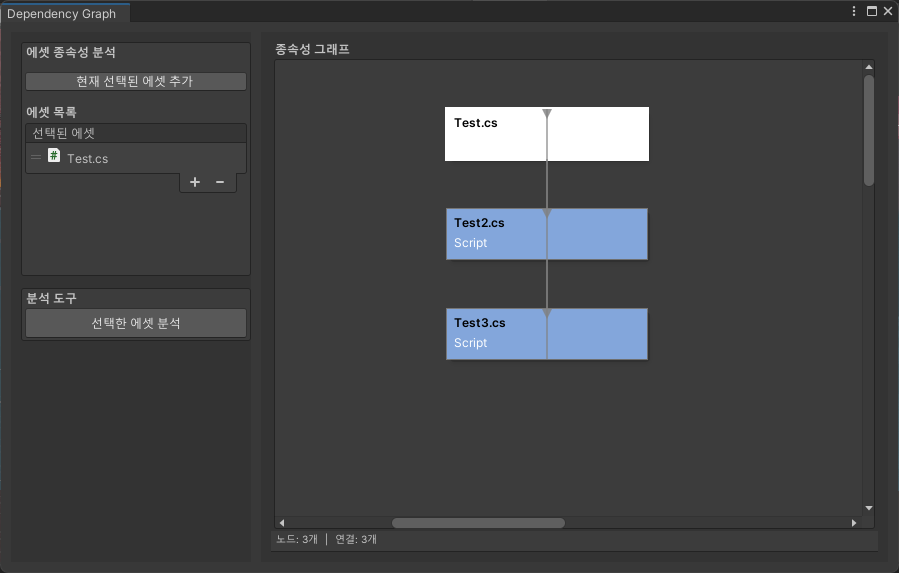
사이클이 형성된 관계를 만들어 분석해 봤다.
표시는 되지만 보기에는 좋지 않다.
node를 그리는 방법을 변경하고 위치를 잡는 방법을 연구해봐야 할 것 같다.
또한, 위처럼 사이클이 만들어지면 연결선의 색을 바꾸는 방식으로 사이클을 표시해 주면 좋을 것 같다.