캐릭터 이동
3인칭 캐릭터 이동에 대해서는 이전에 다룬 적이 있지만 이번에는 파쿠르 시스템을 개발하고 애니메이션 보간 등을 자연스럽게 처리하는 방식을 연구하려 한다.
가장 기본이 되는 이동부터 구현해 보자.
유니티에서 제공하는 튜토리얼 코드를 분석해보며 적용해 보자.
Controller
using UnityEngine;
#if ENABLE_INPUT_SYSTEM
using UnityEngine.InputSystem;
#endif

/* Note: animations are called via the controller for both the character and capsule using animator null checks
 */

namespace StarterAssets
{
    [RequireComponent(typeof(CharacterController))]
#if ENABLE_INPUT_SYSTEM
    [RequireComponent(typeof(PlayerInput))]
#endif
    public class ThirdPersonController : MonoBehaviour
    {
        [Header("Player")]
        [Tooltip("Move speed of the character in m/s")]
        public float MoveSpeed = 2.0f;

        [Tooltip("Sprint speed of the character in m/s")]
        public float SprintSpeed = 5.335f;

        [Tooltip("How fast the character turns to face movement direction")]
        [Range(0.0f, 0.3f)]
        public float RotationSmoothTime = 0.12f;

        [Tooltip("Acceleration and deceleration")]
        public float SpeedChangeRate = 10.0f;

        public AudioClip LandingAudioClip;
        public AudioClip[] FootstepAudioClips;
        [Range(0, 1)] public float FootstepAudioVolume = 0.5f;

        [Space(10)]
        [Tooltip("The height the player can jump")]
        public float JumpHeight = 1.2f;

        [Tooltip("The character uses its own gravity value. The engine default is -9.81f")]
        public float Gravity = -15.0f;

        [Space(10)]
        [Tooltip("Time required to pass before being able to jump again. Set to 0f to instantly jump again")]
        public float JumpTimeout = 0.50f;

        [Tooltip("Time required to pass before entering the fall state. Useful for walking down stairs")]
        public float FallTimeout = 0.15f;

        [Header("Player Grounded")]
        [Tooltip("If the character is grounded or not. Not part of the CharacterController built in grounded check")]
        public bool Grounded = true;

        [Tooltip("Useful for rough ground")]
        public float GroundedOffset = -0.14f;

        [Tooltip("The radius of the grounded check. Should match the radius of the CharacterController")]
        public float GroundedRadius = 0.28f;

        [Tooltip("What layers the character uses as ground")]
        public LayerMask GroundLayers;

        [Header("Cinemachine")]
        [Tooltip("The follow target set in the Cinemachine Virtual Camera that the camera will follow")]
        public GameObject CinemachineCameraTarget;

        [Tooltip("How far in degrees can you move the camera up")]
        public float TopClamp = 70.0f;

        [Tooltip("How far in degrees can you move the camera down")]
        public float BottomClamp = -30.0f;

        [Tooltip("Additional degress to override the camera. Useful for fine tuning camera position when locked")]
        public float CameraAngleOverride = 0.0f;

        [Tooltip("For locking the camera position on all axis")]
        public bool LockCameraPosition = false;

        // cinemachine
        private float _cinemachineTargetYaw;
        private float _cinemachineTargetPitch;

        // player
        private float _speed;
        private float _animationBlend;
        private float _targetRotation = 0.0f;
        private float _rotationVelocity;
        private float _verticalVelocity;
        private float _terminalVelocity = 53.0f;

        // timeout deltatime
        private float _jumpTimeoutDelta;
        private float _fallTimeoutDelta;

        // animation IDs
        private int _animIDSpeed;
        private int _animIDGrounded;
        private int _animIDJump;
        private int _animIDFreeFall;
        private int _animIDMotionSpeed;

#if ENABLE_INPUT_SYSTEM
        private PlayerInput _playerInput;
#endif
        private Animator _animator;
        private CharacterController _controller;
        private StarterAssetsInputs _input;
        private GameObject _mainCamera;

        private const float _threshold = 0.01f;

        private bool _hasAnimator;

        private bool IsCurrentDeviceMouse
        {
            get
            {
#if ENABLE_INPUT_SYSTEM
                return _playerInput.currentControlScheme == "KeyboardMouse";
#else
				return false;
#endif
            }
        }


        private void Awake()
        {
            // get a reference to our main camera
            if (_mainCamera == null)
            {
                _mainCamera = GameObject.FindGameObjectWithTag("MainCamera");
            }
        }

        private void Start()
        {
            _cinemachineTargetYaw = CinemachineCameraTarget.transform.rotation.eulerAngles.y;

            _hasAnimator = TryGetComponent(out _animator);
            _controller = GetComponent<CharacterController>();
            _input = GetComponent<StarterAssetsInputs>();
#if ENABLE_INPUT_SYSTEM
            _playerInput = GetComponent<PlayerInput>();
#else
			Debug.LogError( "Starter Assets package is missing dependencies. Please use Tools/Starter Assets/Reinstall Dependencies to fix it");
#endif

            AssignAnimationIDs();

            // reset our timeouts on start
            _jumpTimeoutDelta = JumpTimeout;
            _fallTimeoutDelta = FallTimeout;
        }

        private void Update()
        {
            _hasAnimator = TryGetComponent(out _animator);

            JumpAndGravity();
            GroundedCheck();
            Move();
        }

        private void LateUpdate()
        {
            CameraRotation();
        }

        private void AssignAnimationIDs()
        {
            _animIDSpeed = Animator.StringToHash("Speed");
            _animIDGrounded = Animator.StringToHash("Grounded");
            _animIDJump = Animator.StringToHash("Jump");
            _animIDFreeFall = Animator.StringToHash("FreeFall");
            _animIDMotionSpeed = Animator.StringToHash("MotionSpeed");
        }

        private void GroundedCheck()
        {
            // set sphere position, with offset
            Vector3 spherePosition = new Vector3(transform.position.x, transform.position.y - GroundedOffset,
                transform.position.z);
            Grounded = Physics.CheckSphere(spherePosition, GroundedRadius, GroundLayers,
                QueryTriggerInteraction.Ignore);

            // update animator if using character
            if (_hasAnimator)
            {
                _animator.SetBool(_animIDGrounded, Grounded);
            }
        }

        private void CameraRotation()
        {
            // if there is an input and camera position is not fixed
            if (_input.look.sqrMagnitude >= _threshold && !LockCameraPosition)
            {
                //Don't multiply mouse input by Time.deltaTime;
                float deltaTimeMultiplier = IsCurrentDeviceMouse ? 1.0f : Time.deltaTime;

                _cinemachineTargetYaw += _input.look.x * deltaTimeMultiplier;
                _cinemachineTargetPitch += _input.look.y * deltaTimeMultiplier;
            }

            // clamp our rotations so our values are limited 360 degrees
            _cinemachineTargetYaw = ClampAngle(_cinemachineTargetYaw, float.MinValue, float.MaxValue);
            _cinemachineTargetPitch = ClampAngle(_cinemachineTargetPitch, BottomClamp, TopClamp);

            // Cinemachine will follow this target
            CinemachineCameraTarget.transform.rotation = Quaternion.Euler(_cinemachineTargetPitch + CameraAngleOverride,
                _cinemachineTargetYaw, 0.0f);
        }

        private void Move()
        {
            // set target speed based on move speed, sprint speed and if sprint is pressed
            float targetSpeed = _input.sprint ? SprintSpeed : MoveSpeed;

            // a simplistic acceleration and deceleration designed to be easy to remove, replace, or iterate upon

            // note: Vector2's == operator uses approximation so is not floating point error prone, and is cheaper than magnitude
            // if there is no input, set the target speed to 0
            if (_input.move == Vector2.zero) targetSpeed = 0.0f;

            // a reference to the players current horizontal velocity
            float currentHorizontalSpeed = new Vector3(_controller.velocity.x, 0.0f, _controller.velocity.z).magnitude;

            float speedOffset = 0.1f;
            float inputMagnitude = _input.analogMovement ? _input.move.magnitude : 1f;

            // accelerate or decelerate to target speed
            if (currentHorizontalSpeed < targetSpeed - speedOffset ||
                currentHorizontalSpeed > targetSpeed + speedOffset)
            {
                // creates curved result rather than a linear one giving a more organic speed change
                // note T in Lerp is clamped, so we don't need to clamp our speed
                _speed = Mathf.Lerp(currentHorizontalSpeed, targetSpeed * inputMagnitude,
                    Time.deltaTime * SpeedChangeRate);

                // round speed to 3 decimal places
                _speed = Mathf.Round(_speed * 1000f) / 1000f;
            }
            else
            {
                _speed = targetSpeed;
            }

            _animationBlend = Mathf.Lerp(_animationBlend, targetSpeed, Time.deltaTime * SpeedChangeRate);
            if (_animationBlend < 0.01f) _animationBlend = 0f;

            // normalise input direction
            Vector3 inputDirection = new Vector3(_input.move.x, 0.0f, _input.move.y).normalized;

            // note: Vector2's != operator uses approximation so is not floating point error prone, and is cheaper than magnitude
            // if there is a move input rotate player when the player is moving
            if (_input.move != Vector2.zero)
            {
                _targetRotation = Mathf.Atan2(inputDirection.x, inputDirection.z) * Mathf.Rad2Deg +
                                  _mainCamera.transform.eulerAngles.y;
                float rotation = Mathf.SmoothDampAngle(transform.eulerAngles.y, _targetRotation, ref _rotationVelocity,
                    RotationSmoothTime);

                // rotate to face input direction relative to camera position
                transform.rotation = Quaternion.Euler(0.0f, rotation, 0.0f);
            }


            Vector3 targetDirection = Quaternion.Euler(0.0f, _targetRotation, 0.0f) * Vector3.forward;

            // move the player
            _controller.Move(targetDirection.normalized * (_speed * Time.deltaTime) +
                             new Vector3(0.0f, _verticalVelocity, 0.0f) * Time.deltaTime);

            // update animator if using character
            if (_hasAnimator)
            {
                _animator.SetFloat(_animIDSpeed, _animationBlend);
                _animator.SetFloat(_animIDMotionSpeed, inputMagnitude);
            }
        }

        private void JumpAndGravity()
        {
            if (Grounded)
            {
                // reset the fall timeout timer
                _fallTimeoutDelta = FallTimeout;

                // update animator if using character
                if (_hasAnimator)
                {
                    _animator.SetBool(_animIDJump, false);
                    _animator.SetBool(_animIDFreeFall, false);
                }

                // stop our velocity dropping infinitely when grounded
                if (_verticalVelocity < 0.0f)
                {
                    _verticalVelocity = -2f;
                }

                // Jump
                if (_input.jump && _jumpTimeoutDelta <= 0.0f)
                {
                    // the square root of H * -2 * G = how much velocity needed to reach desired height
                    _verticalVelocity = Mathf.Sqrt(JumpHeight * -2f * Gravity);

                    // update animator if using character
                    if (_hasAnimator)
                    {
                        _animator.SetBool(_animIDJump, true);
                    }
                }

                // jump timeout
                if (_jumpTimeoutDelta >= 0.0f)
                {
                    _jumpTimeoutDelta -= Time.deltaTime;
                }
            }
            else
            {
                // reset the jump timeout timer
                _jumpTimeoutDelta = JumpTimeout;

                // fall timeout
                if (_fallTimeoutDelta >= 0.0f)
                {
                    _fallTimeoutDelta -= Time.deltaTime;
                }
                else
                {
                    // update animator if using character
                    if (_hasAnimator)
                    {
                        _animator.SetBool(_animIDFreeFall, true);
                    }
                }

                // if we are not grounded, do not jump
                _input.jump = false;
            }

            // apply gravity over time if under terminal (multiply by delta time twice to linearly speed up over time)
            if (_verticalVelocity < _terminalVelocity)
            {
                _verticalVelocity += Gravity * Time.deltaTime;
            }
        }

        private static float ClampAngle(float lfAngle, float lfMin, float lfMax)
        {
            if (lfAngle < -360f) lfAngle += 360f;
            if (lfAngle > 360f) lfAngle -= 360f;
            return Mathf.Clamp(lfAngle, lfMin, lfMax);
        }

        private void OnDrawGizmosSelected()
        {
            Color transparentGreen = new Color(0.0f, 1.0f, 0.0f, 0.35f);
            Color transparentRed = new Color(1.0f, 0.0f, 0.0f, 0.35f);

            if (Grounded) Gizmos.color = transparentGreen;
            else Gizmos.color = transparentRed;

            // when selected, draw a gizmo in the position of, and matching radius of, the grounded collider
            Gizmos.DrawSphere(
                new Vector3(transform.position.x, transform.position.y - GroundedOffset, transform.position.z),
                GroundedRadius);
        }

        private void OnFootstep(AnimationEvent animationEvent)
        {
            if (animationEvent.animatorClipInfo.weight > 0.5f)
            {
                if (FootstepAudioClips.Length > 0)
                {
                    var index = Random.Range(0, FootstepAudioClips.Length);
                    AudioSource.PlayClipAtPoint(FootstepAudioClips[index], transform.TransformPoint(_controller.center), FootstepAudioVolume);
                }
            }
        }

        private void OnLand(AnimationEvent animationEvent)
        {
            if (animationEvent.animatorClipInfo.weight > 0.5f)
            {
                AudioSource.PlayClipAtPoint(LandingAudioClip, transform.TransformPoint(_controller.center), FootstepAudioVolume);
            }
        }
    }
}전체 코드는 위와 같고 입력에 따른 흐름을 따라가며 분석해 보자.
입력
이동을 제어하는 입력이 어떻게 처리되는지가 우선이다.
using UnityEngine;
#if ENABLE_INPUT_SYSTEM
using UnityEngine.InputSystem;
#endif

namespace StarterAssets
{
	public class StarterAssetsInputs : MonoBehaviour
	{
		[Header("Character Input Values")]
		public Vector2 move;
		public Vector2 look;
		public bool jump;
		public bool sprint;

		[Header("Movement Settings")]
		public bool analogMovement;

		[Header("Mouse Cursor Settings")]
		public bool cursorLocked = true;
		public bool cursorInputForLook = true;

#if ENABLE_INPUT_SYSTEM
		public void OnMove(InputValue value)
		{
			MoveInput(value.Get<Vector2>());
		}

		public void OnLook(InputValue value)
		{
			if(cursorInputForLook)
			{
				LookInput(value.Get<Vector2>());
			}
		}

		public void OnJump(InputValue value)
		{
			JumpInput(value.isPressed);
		}

		public void OnSprint(InputValue value)
		{
			SprintInput(value.isPressed);
		}
#endif


		public void MoveInput(Vector2 newMoveDirection)
		{
			move = newMoveDirection;
		}

		public void LookInput(Vector2 newLookDirection)
		{
			look = newLookDirection;
		}

		public void JumpInput(bool newJumpState)
		{
			jump = newJumpState;
		}

		public void SprintInput(bool newSprintState)
		{
			sprint = newSprintState;
		}

		private void OnApplicationFocus(bool hasFocus)
		{
			SetCursorState(cursorLocked);
		}

		private void SetCursorState(bool newState)
		{
			Cursor.lockState = newState ? CursorLockMode.Locked : CursorLockMode.None;
		}
	}

}해당 스크립트가 입력을 처리하는 코드이다.
PlayerInputSystem에 의해 입력이 처리된다.

입력값을 public으로 풀어 이를 참조하여 캐릭터 이동 및 애니메이션에 적용한다.
그리고 커서 Lock도 처리한다.
이동
앞에서 설정된 입력값을 Contoller에서 참조한다.
private StarterAssetsInputs _input;private void Move()
{
float targetSpeed = _input.sprint ? SprintSpeed : MoveSpeed;
if (_input.move == Vector2.zero) targetSpeed = 0.0f;
float currentHorizontalSpeed = new Vector3(_controller.velocity.x, 0.0f, _controller.velocity.z).magnitude;
float speedOffset = 0.1f;
float inputMagnitude = _input.analogMovement ? _input.move.magnitude : 1f;
if (currentHorizontalSpeed < targetSpeed - speedOffset ||
    currentHorizontalSpeed > targetSpeed + speedOffset)
{
    _speed = Mathf.Lerp(currentHorizontalSpeed, targetSpeed * inputMagnitude,
        Time.deltaTime * SpeedChangeRate);

    _speed = Mathf.Round(_speed * 1000f) / 1000f;
}
else
{
    _speed = targetSpeed;
}
_animationBlend = Mathf.Lerp(_animationBlend, targetSpeed, Time.deltaTime * SpeedChangeRate);
if (_animationBlend < 0.01f) _animationBlend = 0f;
Vector3 inputDirection = new Vector3(_input.move.x, 0.0f, _input.move.y).normalized;

if (_input.move != Vector2.zero)
{
    _targetRotation = Mathf.Atan2(inputDirection.x, inputDirection.z) * Mathf.Rad2Deg +
                      _mainCamera.transform.eulerAngles.y;
    float rotation = Mathf.SmoothDampAngle(transform.eulerAngles.y, _targetRotation, ref _rotationVelocity,
        RotationSmoothTime);

    transform.rotation = Quaternion.Euler(0.0f, rotation, 0.0f);
}
Vector3 targetDirection = Quaternion.Euler(0.0f, _targetRotation, 0.0f) * Vector3.forward;
_controller.Move(targetDirection.normalized * (_speed * Time.deltaTime) +
new Vector3(0.0f, _verticalVelocity, 0.0f) * Time.deltaTime);
if (_hasAnimator)
{
_animator.SetFloat(_animIDSpeed, _animationBlend);
_animator.SetFloat(_animIDMotionSpeed, inputMagnitude);
}
}위에서부터 차근차근 분석해 보자.
float targetSpeed = _input.sprint ? SprintSpeed : MoveSpeed;스프린트가 눌렸는지 판단하여 이동 속도를 설정한다.
if (_input.move == Vector2.zero) targetSpeed = 0.0f;만약 이동 vector가 0이라면 속도를 0으로 만들어 이동하지 못하게 막는다.
float currentHorizontalSpeed = new Vector3(_controller.velocity.x, 0.0f, _controller.velocity.z).magnitude;현재 캐릭터의 속도의 크기를 미리 계산한다.
float speedOffset = 0.1f;
float inputMagnitude = _input.analogMovement ? _input.move.magnitude : 1f;입력의 크기를 계산한다.
if (currentHorizontalSpeed < targetSpeed - speedOffset ||
currentHorizontalSpeed > targetSpeed + speedOffset)
{
_speed = Mathf.Lerp(currentHorizontalSpeed, targetSpeed * inputMagnitude,
Time.deltaTime * SpeedChangeRate);
_speed = Mathf.Round(_speed * 1000f) / 1000f;
}
else
{
_speed = targetSpeed;
}미리 계산된 현재 속력, 입력 등을 고려해서 이동 속도를 결정하는 로직이다.
목표 속력에 speedOffset을 통해 일정 구간을 만든 뒤 현재 속도가 그 구간에 포함되어 있지 않다면 속도를 보간하여 목표 속력에 유지되도록 변경한다.
그렇지 않고 이미 유효한 속력이라면 그대로 적용한다.
속력을 보관할 때 목표 속력에 입력 크기와 SpeedChangeRate를 곱해 보간 속도를 결정하는 것을 유의하자.
다음은 캐릭터 회전에 대한 코드이다.
Vector3 inputDirection = new Vector3(_input.move.x, 0.0f, _input.move.y).normalized;
if (_input.move != Vector2.zero)
{
_targetRotation = Mathf.Atan2(inputDirection.x, inputDirection.z) * Mathf.Rad2Deg +
_mainCamera.transform.eulerAngles.y;
float rotation = Mathf.SmoothDampAngle(transform.eulerAngles.y, _targetRotation, ref _rotationVelocity,
RotationSmoothTime);
transform.rotation = Quaternion.Euler(0.0f, rotation, 0.0f);
}입력을 통해 방향벡터를 계산한다.
그리고 입력이 존재한다면 캐릭터가 회전할 방향을 계산한다.
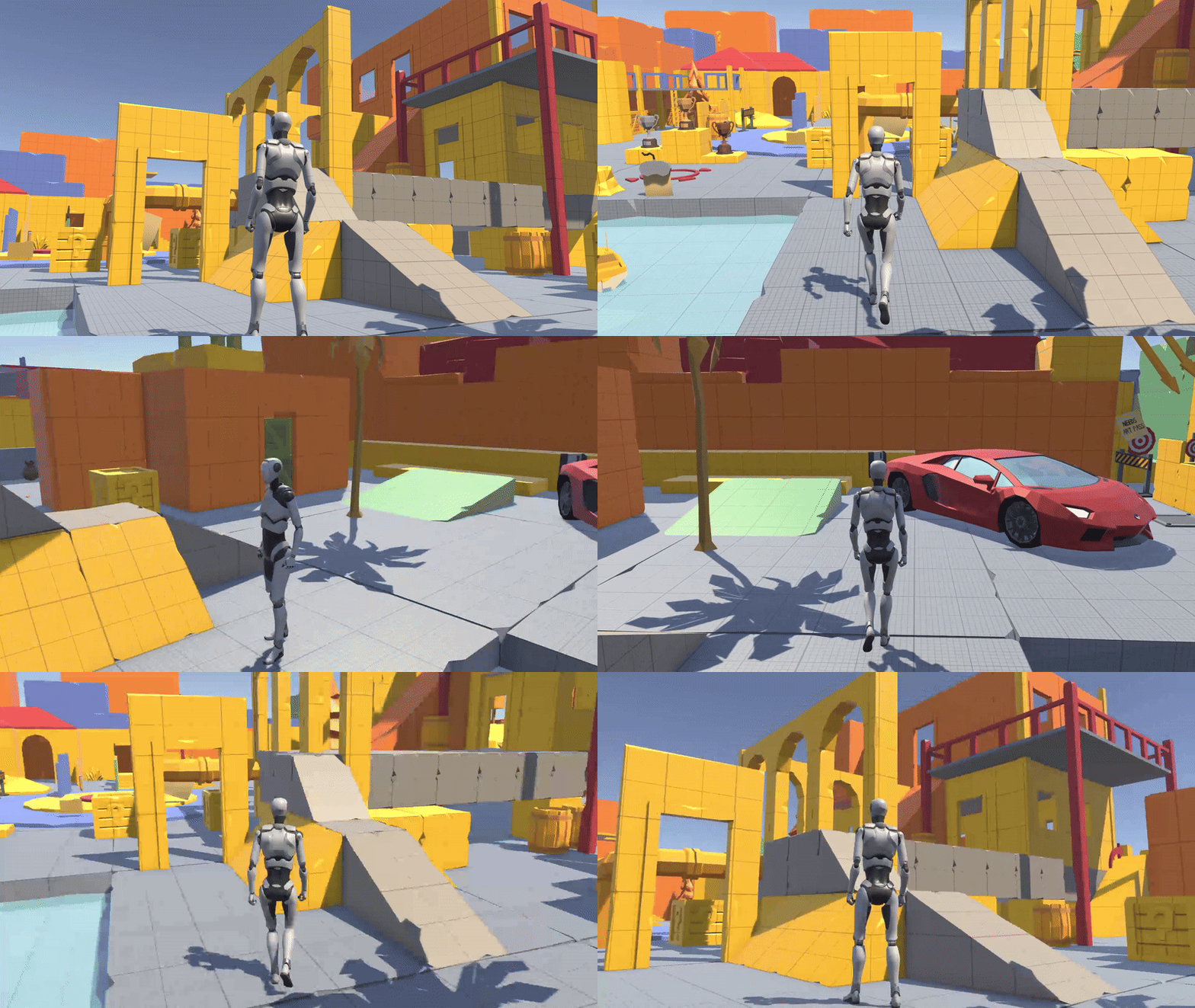
캐릭터의 회전은 카메라가 바라보고 있는 화면이 어디인지에 따라 이동할 방향이 달라진다.
예를 들어 W키를 눌러 앞으로 이동한다면 카메라가 보고 있는 방향으로 나아가는 게 자연스러운 조작감을 준다.
따라서 앞방향(카메라가 바라보는 방향)을 계산하여 캐릭터를 회전시켜야 하는 것이다.
Atan2를 통해 입력 방향이 어디인지 계산한다.
    	Z축 (0°)
         ↑
         |
(-X) ←---+---→ (+X) (90°)
         |
         ↓
(-Z) (180°)이 결과는 Radian으로 나오기 때문에 Degree로 변경하여 적용해야 한다.
그리고 카메라의 y축 회전량을 더하면 캐릭터가 바라봐야 하는 방향을 계산할 수 있다.
이렇게 동작하는 이유는 Atan2를 통해 구하는 벡터의 각도는 위의 표와 같이 항상 동일하게 계산된다.
카메라의 회전량 또한 월드 좌표를 기준으로 얼마나 회전했는지 계산하기 때문에 이 둘을 더하면 최종적으로 캐릭터가 바라볼 방향을 계산할 수 있다.
이후 SmoothDampAngle로 회전값을 보간하여 최종 회전값을 계산한다.
Vector3 targetDirection = Quaternion.Euler(0.0f, _targetRotation, 0.0f) * Vector3.forward;

_controller.Move(targetDirection.normalized * (_speed * Time.deltaTime) +
new Vector3(0.0f, _verticalVelocity, 0.0f) * Time.deltaTime);최종적으로 forward를 곱해 벡터로 변환하여 캐릭터를 이동시킨다.
if (_hasAnimator)
{
    _animator.SetFloat(_animIDSpeed, _animationBlend);
    _animator.SetFloat(_animIDMotionSpeed, inputMagnitude);
}그리고 애니메이션을 적용한다.
이때 blend값을 계산하는 방법은 다음과 같다.
_animationBlend = Mathf.Lerp(_animationBlend, targetSpeed, Time.deltaTime * SpeedChangeRate);
if (_animationBlend < 0.01f) _animationBlend = 0f;이는 캐릭터가 걷는 모션을 결정하는 값이 된다.
상하 이동(점프)
rigid body를 사용하면 중력을 자동으로 적용할 수 있지만 이동 처리가 까다로운 부분이 있다.
그래서 CharacterController를 사용하는 경우가 대부분이다.
하지만 CharacterController에는 한 가지 문제가 있다.
중력이 자동으로 적용되지 않는다는 것이다.
따라서 중력을 계산해 주는 코드가 필요하다.
private void JumpAndGravity()
{
    if (Grounded)
    {
        _fallTimeoutDelta = FallTimeout;

        if (_hasAnimator)
        {
            _animator.SetBool(_animIDJump, false);
            _animator.SetBool(_animIDFreeFall, false);
        }

        if (_verticalVelocity < 0.0f)
        {
            _verticalVelocity = -2f;
        }

        if (_input.jump && _jumpTimeoutDelta <= 0.0f)
        {
            _verticalVelocity = Mathf.Sqrt(JumpHeight * -2f * Gravity);

            if (_hasAnimator)
            {
                _animator.SetBool(_animIDJump, true);
            }
        }

        if (_jumpTimeoutDelta >= 0.0f)
        {
            _jumpTimeoutDelta -= Time.deltaTime;
        }
    }
    else
    {
        _jumpTimeoutDelta = JumpTimeout;

        if (_fallTimeoutDelta >= 0.0f)
        {
            _fallTimeoutDelta -= Time.deltaTime;
        }
        else
        {
            if (_hasAnimator)
            {
                _animator.SetBool(_animIDFreeFall, true);
            }
        }

        _input.jump = false;
    }

    if (_verticalVelocity < _terminalVelocity)
    {
        _verticalVelocity += Gravity * Time.deltaTime;
    }
}우선 Ground여부를 따져 동작이 달라진다.
if (Grounded)
{
    _fallTimeoutDelta = FallTimeout;

    if (_hasAnimator)
    {
        _animator.SetBool(_animIDJump, false);
        _animator.SetBool(_animIDFreeFall, false);
    }

    if (_verticalVelocity < 0.0f)
    {
        _verticalVelocity = -2f;
    }

    if (_input.jump && _jumpTimeoutDelta <= 0.0f)
    {
        _verticalVelocity = Mathf.Sqrt(JumpHeight * -2f * Gravity);

        if (_hasAnimator)
        {
            _animator.SetBool(_animIDJump, true);
        }
    }

    if (_jumpTimeoutDelta >= 0.0f)
    {
        _jumpTimeoutDelta -= Time.deltaTime;
    }
}땅에 닿아있으면 _fallTimeoutDelta을 재설정한다.
이후 애니메이션을 초기화해 준다.
jump입력이 들어오고 timeout이 유효한 값이라면 수직 속도를 계산한다.
이 계산식은 $\sqrt{2gh}$이다.
이는 다음과 같이 계산된다.
// 초기 운동에너지 = 최고점에서의 위치에너지
(1/2) * m * v² = m * g * h

// 질량(m) 약분
(1/2) * v² = g * h

// v에 대해 정리
v² = 2 * g * h
v = √(2 * g * h)초기 수직 속도를 계산한 뒤 이를 점차 감소시키는 방식으로 동작한다.
이때 애니메이션도 설정해 준다.
그리고 jumpTimeoutDelta를 계산하는 이유는 연속으로 점프가 되지 않도록 하기 위함이다.
else
{
    _jumpTimeoutDelta = JumpTimeout;

    if (_fallTimeoutDelta >= 0.0f)
    {
        _fallTimeoutDelta -= Time.deltaTime;
    }
    else
    {
        if (_hasAnimator)
        {
            _animator.SetBool(_animIDFreeFall, true);
        }
    }

    _input.jump = false;
}이는 점프 상태에서의 코드이다.
_fallTimeoutDelta가 0보다 크다면 계속해서 감소시킨다.
이는 0 이하로 떨어지면 freefall애니메이션이 실행되도록 하기 위함이다.
바닥 체크
점프를 하기 위해서는 바닥에 닿아야 한다.
바닥에 닿았는지 체크하는 로직은 다음과 같다.
private void GroundedCheck()
{
    Vector3 spherePosition = new Vector3(transform.position.x, transform.position.y - GroundedOffset,
        transform.position.z);
    Grounded = Physics.CheckSphere(spherePosition, GroundedRadius, GroundLayers,
        QueryTriggerInteraction.Ignore);

    if (_hasAnimator)
    {
        _animator.SetBool(_animIDGrounded, Grounded);
    }
}spherePosition을 바닥 쪽으로 offset을 주어 설정하고 Physics.CheckSphere를 통해 충돌체가 있는지 계산한다.
카메라 회전
private void CameraRotation()
{
    if (_input.look.sqrMagnitude >= _threshold && !LockCameraPosition)
    {
        float deltaTimeMultiplier = IsCurrentDeviceMouse ? 1.0f : Time.deltaTime;

        _cinemachineTargetYaw += _input.look.x * deltaTimeMultiplier;
        _cinemachineTargetPitch += _input.look.y * deltaTimeMultiplier;
    }

    _cinemachineTargetYaw = ClampAngle(_cinemachineTargetYaw, float.MinValue, float.MaxValue);
    _cinemachineTargetPitch = ClampAngle(_cinemachineTargetPitch, BottomClamp, TopClamp);

    CinemachineCameraTarget.transform.rotation = Quaternion.Euler(_cinemachineTargetPitch + CameraAngleOverride,
        _cinemachineTargetYaw, 0.0f);
}input의 look의 크기가 threshold보다 크거나 같으면서 Lock이 되지 않았다면 회전을 적용시킨다.
현재 디바이스의 종류에 따라 회전 속도를 조절할 수 있게 deltaTimeMultiplier를 설정한다.
Yaw, Pitch 값을 설정된 속도와 입력값을 곱해 설정한다.
그리고 상하좌우 Clamp를 걸어 비정상적인 동작을 방지한다.
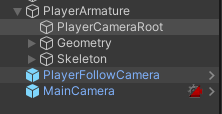
그리고 마지막으로 캐릭터 밑에 카메라 루트 오브젝트를 돌려 회전을 처리한다.